Your Health, Made More Personal
Profmed Digital Health Journey
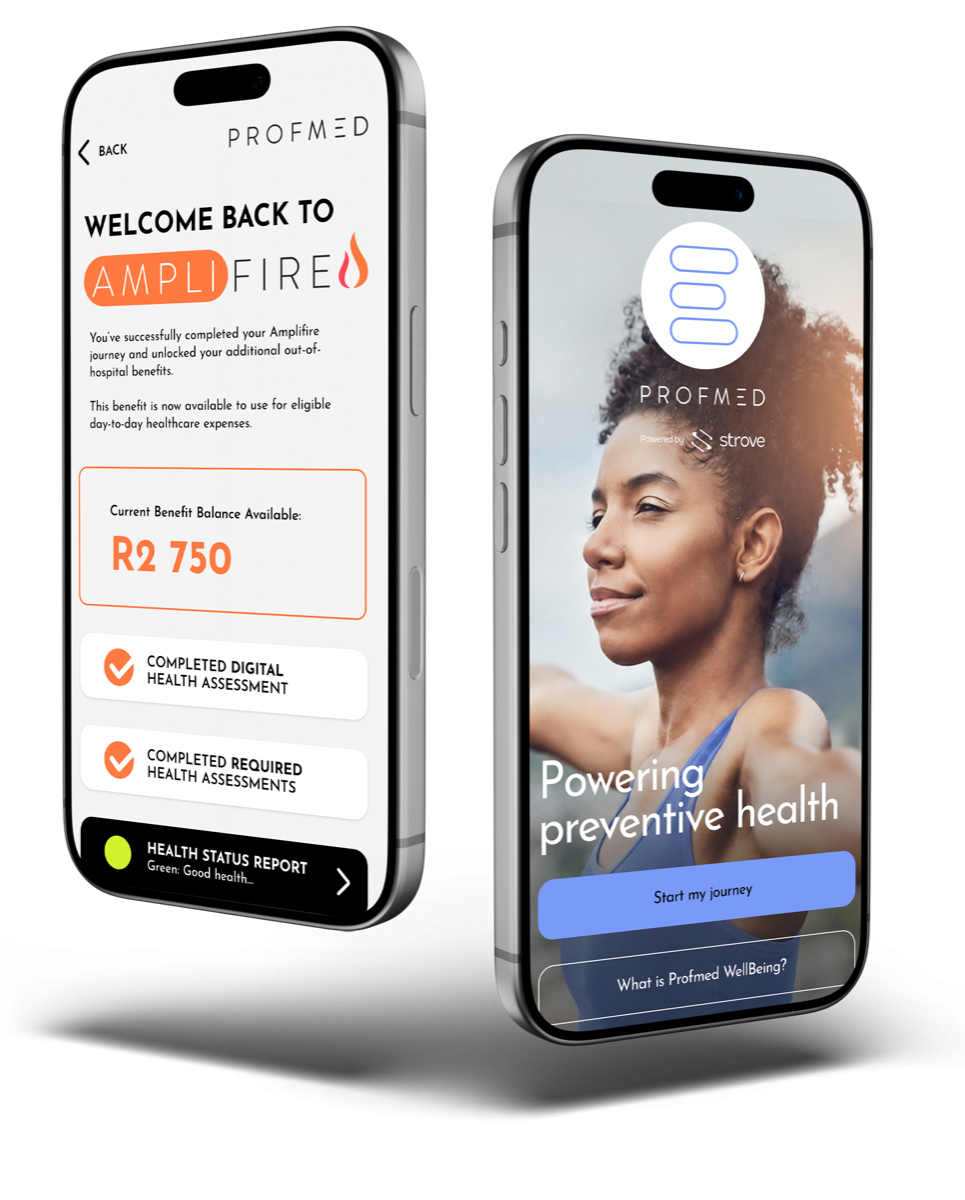
Profmed is launching the Digital Health Consumer Journey on the Profmed App, a smarter and more personalised way for members to understand their health, take proactive steps and unlock more value from their membership. Through this guided digital experience, members can complete a quick digital health assessment, track their progress, follow relevant preventative care actions, view their Amplifire benefit balance and access their personalised Digital Health Assessment Report.
Frequently Asked Questions
Below are answers to some of the most common questions you may have about the Profmed Digital Health Journey.
About the Journey
What is the Profmed Digital Health Journey?
The Digital Consumer Engagement Journey is a personalised health experience available through the Profmed App.
What is Amplifire?
Amplifire is an additional benefit designed to support eligible out-of-hospital healthcare expenses once the required health actions have been completed, subject to applicable criteria, protocols and benefit rules.
Why has Profmed introduced this journey?
Profmed introduced the initiative to give members improved connectivity with their health engagement. It prioritises preventative care, simplifies benefit comprehension, and enables members to make informed wellbeing choices.
Is this replacing the existing Profmed App?
No. The initiative expands the Profmed App by introducing fresh health engagement features while maintaining existing functionality. Members continue accessing claims submission, benefit viewing, membership cards, documents, and emergency services.
Access and Eligibility
How do I access the Digital Health Journey?
Open the Profmed App, log in securely and look for the Amplifire Health Journey tile at the top of your home screen and start your journey there.
Do I need to download the new App?
Yes. Make sure it is updated to the latest version. If you do not have the app yet, download it from your app store and register using your membership details.
Who can use the journey?
The journey is available to eligible Profmed members and beneficiaries who meet the relevant criteria. Some actions, screenings or benefit unlocking requirements may differ based on your profile, age, gender, membership status and benefit rules.
What information do I need to register or log in?
You will need your Profmed membership details and secure login credentials. If you are using the App for the first time, follow the registration prompts.
Consent and Privacy
Why am I asked to consent to health data access before starting my digital health journey?
Consent allows Profmed to use your digital health assessment results and wellbeing data to personalise your journey, track your progress, generate your Health Status Report and provide relevant benefit recommendations.
What happens if I do not give consent?
If you decline consent, Profmed may not be able to personalise your journey, track your Amplifire progress, unlock additional benefits or generate your Health Status Report.
Can I change my consent later?
Yes. You should be able to update your consent preferences through your App profile settings, subject to the App’s available functionality and Profmed’s applicable terms and conditions.
Is my health data secure?
Yes. Health data is stored securely and used to support your personalised Profmed App experience. The journey has been designed with privacy and security in mind, and health data is handled in line with Profmed’s applicable privacy and data protection requirements.
Is my facial scan stored?
The facial scan is used to generate health metrics for your journey. The App messaging indicates that your facial scan is processed to support the assessment and only the relevant health metrics are saved to track your progress and personalise your experience.
Digital Health Assessment
What is the digital health assessment?
The digital health assessment is a quick, contactless assessment completed on the Profmed App. It uses facial scanning technology to analyse key health indicators and create a starting health snapshot for your personalised journey.
What does the assessment measure?
The assessment may analyse indicators such as heart rate and variability, blood pressure indicators, stress and anxiety levels, respiratory rate, oxygen saturation and a general wellness score.
How do I complete the assessment?
On the Profmed App, select the Amplifire Health Journey and do the digital health assessment. Position your face within the on-screen frame, remain still and follow the prompts until the scan is complete.
How long does the assessment take?
The assessment is designed to be quick and easy to complete on the App. The exact time may vary depending on your device, lighting and whether the scan is successful on the first attempt.
What should I do if the scan fails?
If the scan fails, follow the on-screen instructions and try again. Make sure your face is clearly visible, stay still while the scan is in progress and ensure you are in a well-lit environment.
Does the assessment replace a medical consultation?
No. The assessment is intended to provide a health snapshot and support personalised guidance. It does not replace professional medical advice, diagnosis or treatment. If you are concerned about your health, please consult a qualified healthcare provider.
Health Actions and Amplifire Benefits
What are required health actions?
Required health actions are the steps shown in your Amplifire Health Journey that help you progress towards unlocking benefits. These may include your digital health assessment, relevant preventative care screenings, physical health assessments if required, and chronic treatment compliance if applicable.
Will everyone have the same required actions?
No. Your required actions may differ based on your profile, age, gender, health assessment outcomes, option rules and applicable benefit criteria.
What preventative screenings may be included?
Depending on your profile, preventative care may include screenings such as mammograms, pap smears, HPV screenings, prostate-specific antigen tests, faecal occult blood tests, bone density scans or other applicable preventative care benefits.
Are preventative care screenings paid for by the Scheme?
Yes, preventative care screenings are paid from risk on all benefit options.
What if I recently completed a screening?
If you have already completed a relevant screening, the App may need time to receive or reflect the information. Follow the App prompts and contact Profmed if your journey does not update after the expected processing period.
What happens if I do not complete all required actions?
You may not be able to unlock the additional Amplifire benefit until the required actions are completed. Your journey dashboard will show what is complete and what is still outstanding.
How much additional value can I unlock?
The available amount may depend on the applicable year, benefit design and eligibility criteria. For 2026, qualifying members can unlock an additional R2 750 added to their day-to-day benefits.
What can the unlocked benefit be used for?
The unlocked benefit is intended to support eligible day-to-day, out-of-hospital healthcare expenses. Examples may include GP consultations, specialist consultations, optometry, acute medication, conservative dentistry or supplementary services, depending on the applicable benefit rules and limits.
How do I know if I have unlocked the benefit?
Your Amplifire Health Journey dashboard will show your progress. Once you have completed the required actions and they have been processed, you should be able to view your Amplifire benefit balance on the Profmed App.
Can I use the benefit immediately after completing my actions?
The benefit should become available once all required actions have been completed, verified and processed. If your App does not update immediately, allow time for processing and contact Profmed if you need assistance.
Your Digital Health Assessment Report
What is the Digital Health Assessment Report?
The Digital Health Assessment Report is a personalised summary that gives you a simple view of your health after completing the relevant assessments. It may show an overall health status and provide insights into areas such as mental health, heart health and physiological health.
What do the green, amber and red statuses mean?
The colour statuses are intended to help you understand your overall health snapshot in a simple way. Green generally indicates that you are on track, amber may highlight areas that need attention, and red may indicate that follow-up action or professional advice is recommended.
Should I be worried if my status is amber or red?
An amber or red status does not automatically mean something is seriously wrong, but it does indicate that you may need to pay closer attention to certain areas of your health. If you have concerns, please consult a qualified healthcare provider.
Can I download or share my Digital Health Assessment Report?
The Digital Health Assessment Report will be emailed to you once you have completed your scan. Always consider your privacy before sharing personal health information.
Profmed WellBeing
What is Profmed WellBeing?
Profmed WellBeing is an ongoing wellbeing experience that supports physical, mental and emotional wellbeing. It helps members stay engaged beyond once-off assessments by encouraging healthier habits, activity tracking, wellbeing check-ins and ongoing motivation.
How does Profmed WellBeing connect to Amplifire?
The Amplifire Health Journey helps you understand your health and unlock additional benefits through required health actions, while Profmed WellBeing helps you continue engaging with your wellbeing through everyday activities, tools and content.
Do I need a wearable device to use Profmed WellBeing?
Some wellbeing features may work best when connected to a wearable or health app, but available functionality may vary. Members should follow the prompts on the App to connect compatible devices or use the available wellbeing features.
What kind of wellbeing activities can I access?
Profmed WellBeing may include tools and activities that support movement, fitness, nutrition, stress management, emotional wellbeing, personal health goals and challenges.
Troubleshooting and Support
I cannot see the Amplifire Health Journey in my App. What should I do?
Check that your Profmed App is updated to the latest version and that you are logged in with the correct membership details. If the journey still does not appear, contact Profmed for assistance.
My progress is not updating. What should I do?
Some actions may take time to process or verify. Check back later, ensure all required steps were completed correctly and contact Profmed if your progress does not update after the expected processing time.
I completed a screening, but the App still shows it as outstanding. Why?
The screening information may not yet have been received, matched or processed. Allow time for the update to reflect and contact Profmed if the status remains unchanged.
What if I forget my App password?
Use the “Forgot password” option on the Profmed App login screen and follow the prompts to reset your password securely.
Who can I contact for help?
If you need support with the Profmed App, your Amplifire Health Journey, benefit balance, Health Status Report or any outstanding actions, please contact Profmed through the available member support channels.
GET THE PROFMED APP
Start your Digital Health Journey today. Download the Profmed App to complete your digital health assessment, track your progress and unlock your Amplifire benefit.